hotelwebby
TR EN
Sign in Free trial

WhatsApp Guest Assistant

Answer your guests 24/7 from your hotel's own WhatsApp number.

The HotelWebby assistant answers frequent questions with your hotel's own information, in the guest's language, and sends requests such as towels, room service or a taxi to the right team's WhatsApp as a job.

  • No credit card
  • No commitment
  • Setup support included
RequestsSample Hotel
214 Towels OpenStarted Housekeeping · #12 · 02:16
108 Room serviceCompleted Restaurant & Bar · #11 · 01:48
Sample HotelThe guest's WhatsApp

What time is breakfast?

Dear guest, breakfast is served as an open buffet in our main restaurant between 07:00 and 10:30.

Could I have two towels in room 214, please?

Your request has been passed to housekeeping.

24/7 answers for your guests
4languages Turkish, English, German, Russian
Official Meta API WhatsApp Business Platform
Your number stays no new line needed

Try it now

The chat your guest sees on WhatsApp

In this example the guest writes from the QR room card in the room: the room number is added to the message automatically and the request goes to the right team as a job.

  • The guest writes in their own language and gets the answer in the same language
  • Staff complete the job from WhatsApp with one tap
  • Every request is also tracked in the panel

Try it yourself: write to the assistant in the window at the bottom right of this page; it answers with the information of a real hotel.

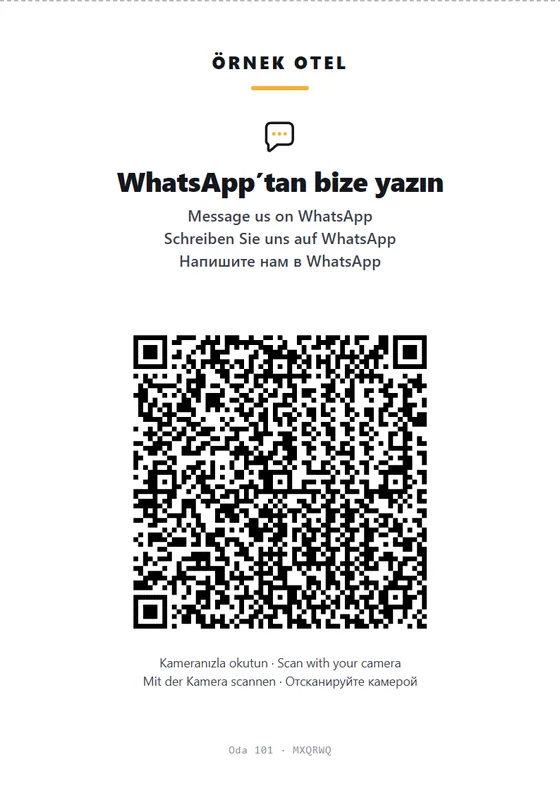
Printed QR room card of a sample hotel: “Message us on WhatsApp” in four languages
Sample HotelWhatsApp
From the QR room card · Room 101

The air conditioning isn't working, could someone take a look?

Dear guest, your request has been passed to technical service.

Technical service · Completed Room 101 · air conditioning

How it works

One request from start to finish: the guest writes, the assistant answers, your team takes the job and the panel keeps the record.

  1. The guest writes

    On WhatsApp, from the QR room card or from the window on your hotel's website, in their own language.

    Could you arrange a taxi to the airport for 09:00 tomorrow?

  2. The assistant answers

    Frequent questions are answered from your knowledge base; a request is passed to the right department and the guest is told.

    Dear guest, your request has been passed to reception.

  3. Your team takes the job

    The request reaches the department's staff on WhatsApp; they accept and complete it with the buttons under the message.

  4. The panel keeps track

    Who accepted it, when it was completed and how long it took; the request report shows the whole picture.

    #18 · TaxiCompleted Reception · handled in 6 min

The guest writes, the assistant answers, your team completes the job

The assistant works with your hotel's own information; anything it cannot answer is passed to your team.

Instant answers to frequent questions

Breakfast hours, pool, Wi‑Fi, check-out: answered from your hotel's knowledge base in the guest's language. A question the assistant cannot answer goes to reception.

  1. Guest“When does the pool close?”
  2. AssistantAnswers with the pool hours from the knowledge base
  3. TeamQuestions without an answer go to reception
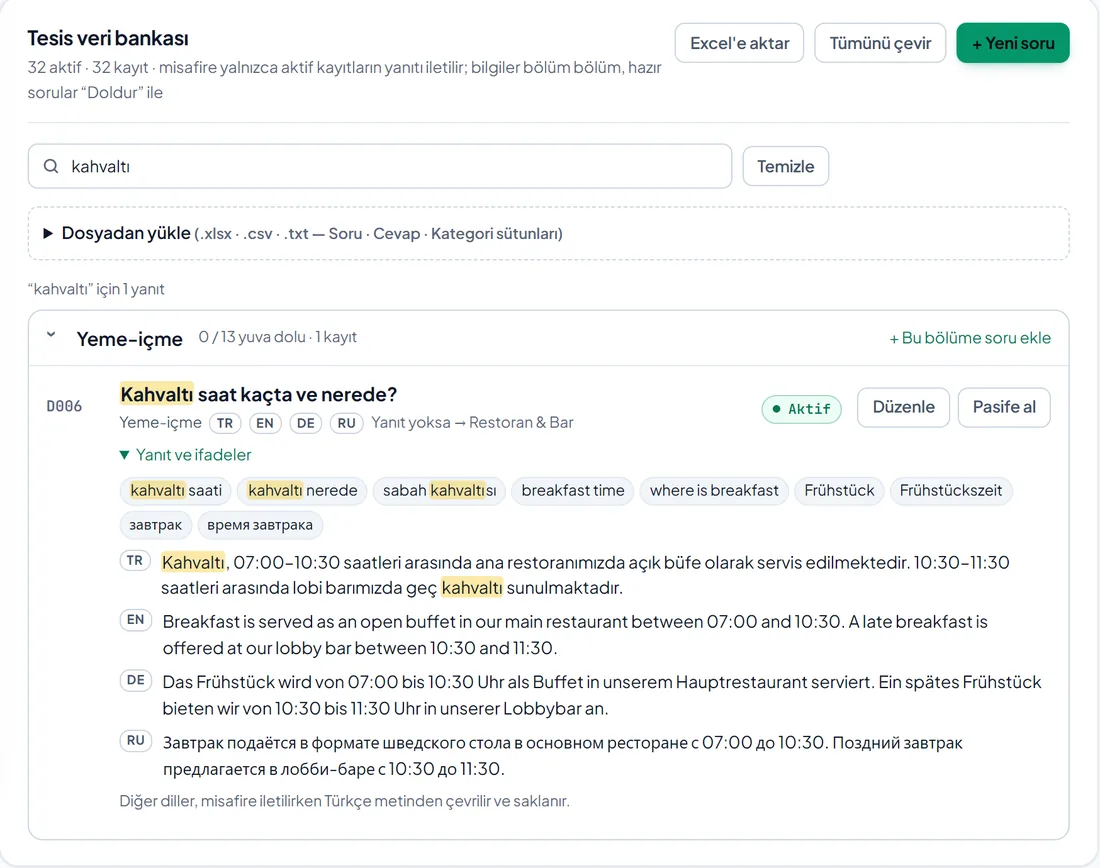
The knowledge base in the panel: the breakfast question with its answer in Turkish, English, German and Russian

Requests reach the right team

Towels, room service, a technical fault: the request goes to the department's staff on WhatsApp, and they complete it there with one tap (taken, completed).

  1. Guest“The air conditioning isn't working.”
  2. AssistantPasses it to technical service
  3. TeamTaps Accepted, then Completed

Website window

The same assistant answers on your hotel's website and, when needed, passes the conversation to your team.

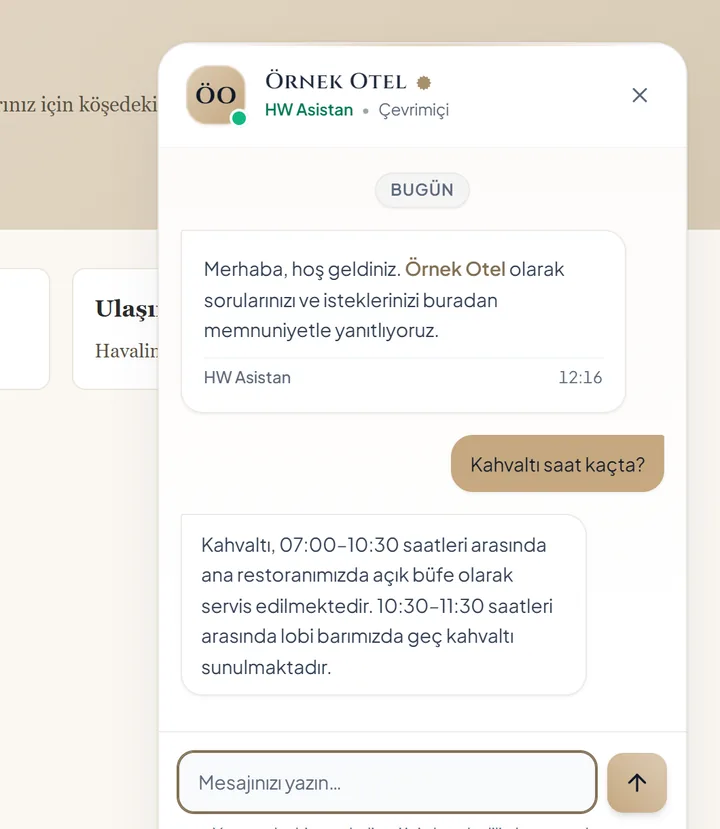
  1. Visitor“What time is breakfast?”
  2. AssistantAnswers in the window with the same information
  3. TeamTakes over when the assistant cannot help
Chat window on a sample hotel website: the visitor asks about breakfast and the assistant answers

QR room cards

The guest writes from the room with a single tap; the room number is added to the message automatically.

Photos, documents and voice messages

Photos, documents and voice messages the guest sends are passed to the right team.

Everything in the panel

Requests, conversations and the request report are tracked together in the panel.

In the guest's language

Whatever language the guest writes in, the answer comes in the same language: Turkish, English, German or Russian.

TR

Kahvaltı saat kaçta?

Kahvaltı, 07:00–10:30 saatleri arasında ana restoranımızda açık büfe olarak servis edilmektedir.

EN

What time is breakfast?

Breakfast is served as an open buffet in our main restaurant between 07:00 and 10:30.

DE

Wann gibt es Frühstück?

Das Frühstück wird von 07:00 bis 10:30 Uhr als Buffet in unserem Hauptrestaurant serviert.

RU

Во сколько завтрак?

Завтрак подаётся в формате шведского стола в основном ресторане с 07:00 до 10:30.

Included services Setup and training are included

Setup

We set it up with you; your password never reaches us.

Training

A short session for your front desk team.

Support

Support by phone and email.

Updates

Nothing to install; updates arrive automatically.

Same night, two ways

Done by hand
With the assistant
A breakfast question at 2 a.m.
The message is seen in the morning; the guest waits for hours.
The assistant answers right away, in the guest's language, from your hotel's knowledge base.
A towel request in another language
The message is translated, the team is called, and someone gets back to the guest separately.
The request goes to housekeeping's WhatsApp as a job, and the guest is informed in their own language.
Five questions at the same time
Reception answers them one by one; the last guest to write waits.
Every guest gets an answer at once; a question the assistant cannot answer is passed to your team.
A request forgotten by staff
The request lives on a note or in someone's head; the guest has to ask again.
A reminder is sent for a request that is not completed, and every request is tracked in the panel.
Official channel, your own number, your own retention period

The assistant runs on Meta's official platform; the privacy notice and how long messages are kept are set by your hotel.

Meta's official WhatsApp Business Platform

As your hotel's technology provider, HotelWebby connects your number to Meta's official WhatsApp Business Platform. No unofficial method or interface is used.

Your number and your WhatsApp Business app stay with you

You make the connection yourself from the panel, with your own Meta account; the number does not change and no new line is needed. The number keeps working in the WhatsApp Business app on the hotel's phone.

Card numbers are masked

If a guest writes a card number in a message, the number is masked.

The privacy notice and retention period are the hotel's settings

The hotel sets its own privacy notice (KVKK) and the message retention period from the panel.

Staff see only their own department's requests

Housekeeping, technical service or reception: each staff member sees only the requests sent to their own department.

Old chats are never copied to the panel

WhatsApp conversations from before the connection are not brought into the panel; it only shows messages that arrive after the connection.

Read the full security page

Up and running in three steps

You can create your account yourself in a few minutes. Our support team is with you at every stage of the setup.

  1. Open your account

    Two minutes, with a code sent to your email.

  2. Connect your WhatsApp number

    Connect your WhatsApp Business number from the panel with your own Meta account; the number does not change.

  3. Enter your information

    Enter your hotel's information in the knowledge base and your team's numbers in the departments; the assistant starts answering.

Open your account

Frequently asked

Can't find your question? Write to us and we will answer.

Does my number change?

No. Your hotel's existing WhatsApp Business number is connected to Meta's official WhatsApp Business Platform from the panel, with your own Meta account; no new line is needed. The number keeps working in the WhatsApp Business app on the hotel's phone.

Could the assistant give a guest wrong information?

The assistant answers only with the information in your hotel's knowledge base. It does not guess at a question the knowledge base cannot answer; it passes the question to your team.

Which languages does it answer in?

Turkish, English, German and Russian. The assistant replies in whichever of these languages the guest writes in.

How does my team see the requests?

Each request is sent to the staff of the right department on WhatsApp, and they complete it there with one-tap buttons (taken, completed). Requests and conversations are also tracked in the panel, where each staff member sees only their own department's requests.

How long does setup take?

You connect your number from the panel with your own Meta account in a few minutes. You then enter your hotel's information in the knowledge base and your team's numbers in the departments, and the assistant starts answering with that information. Our support team is with you at every stage of the setup.

How long are messages kept?

The hotel sets the retention period itself, from the panel. The hotel's privacy notice (KVKK) is also entered in the panel.

How would you like to start?

On your own

Open an account and try it for 14 days

Opening an account takes two minutes, and our team supports you throughout setup. Every feature is on; no card is asked for.

Try it free for 14 days
With us

Request a demo

Leave your details and we get back to you the same day:

  1. a 20-minute call
  2. a live demo on your own WhatsApp number
  3. a written quote for your property count

Takes about 30 seconds. We only use these details to contact you about HotelWebby — no password or card information is ever requested. Privacy notice